


Meijer - Delivery & Pickup
3.829.01K Reviews
App Specs
- Version
- 10.71.0
- Updated On
- License
- Free
- Downloads
- 5,000,000+
- Developer
- Meijer
- Categories
- Shopping
- Platform
- Android, iOS
Screenshots
 Analysis by AppCompare
I tend to judge a grocery app by what it lets me understand and control before I place an order, not just by how quickly I can fill a cart. That matters especially when an app asks me to make choices about an account, a shopping method, and a time-sensitive order. Meijer’s shopping app is built around getting groceries through delivery or pickup, so its value depends on whether those options fit the way you actually shop—not simply on whether the screen looks convenient.
A familiar retailer, with a practical trust question
Meijer is a free shopping app from Meijer, and it has been available since 2013. Its 3.8 average from around 77,000 ratings suggests a generally useful experience that does not satisfy everyone equally; I would treat that as a reason to check whether its local shopping options suit me, rather than as a guarantee of a flawless order. It has passed 5 million installs, is rated for Everyone, and its current version is 10.62.0, with Android 7.0 as the minimum system requirement.
For me, the important distinction is between a retailer’s app being convenient and my having a clear basis for trusting each choice I make in it. The useful approach is to pay attention to what the app asks for as I use it, review the account and order details before confirming, and avoid treating a familiar store name as a substitute for checking the choices on screen.
Keep control at the points that matter
Creating an account or signing in is part of the setup described in the app’s shopping flow. I would use the account I actually want associated with grocery orders, then take a moment to check the selected store, fulfillment method, and order details before checkout. Those are practical controls over the purchase itself: a small review at the right moment can prevent a misplaced pickup plan or an order going through the wrong route.
Delivery and pickup serve different needs, so I would choose them deliberately rather than assume one is always better. Delivery is useful when getting to a store is difficult; pickup can make more sense when I am already nearby and want to collect a planned order. The app’s central promise is giving shoppers these routes, but the best choice depends on the trip, timing, and what I need that day.
Be thoughtful when building the cart
Grocery orders involve many small decisions, and I find it easier to handle them in stages: search for the essentials, browse the relevant departments, then review the whole cart before choosing a time. Past purchases can help with repeat shopping, but they are a starting point, not a substitute for checking quantities and whether each item belongs on this week’s list. That habit is particularly useful when I am ordering for more than one person or shopping around a specific meal plan.
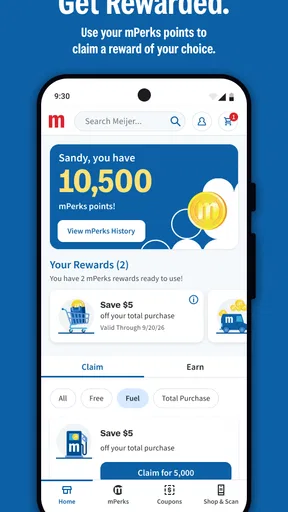
Offers and mPerks can make the app more worthwhile for someone who already shops at Meijer. I would check the deal details as I build the cart and make sure an offer fits what I planned to buy, rather than adding something just because it appears as a saving. The real benefit is easiest to judge against the final basket and the trip it replaces, not by the presence of a promotion alone.
Worth Reading Before You Choose

EA SPORTS FC Mobile 26 Is a Bigger Football Game, but It Takes Time

Flipboard Shows What News Apps Must Do Beyond the Feed

Switching to Android Auto Means Rethinking Your Driving Routine

Google Calendar Makes a Crowded Week Easier to Manage

Ludo King Makes the Most of the Minutes Between Plans

Baby Panda World Brings Quick Play to Modern Phones, but Its Game Library Feels Busy
Use the order flow without rushing
Have you ever found yourself at home craving your favorite groceries from Meijer, but the thought of stepping out just seems too daunting? Well, let me introduce you to a little gem that's about to make your life a whole lot easier: the Meijer - Delivery & Pickup app. I've given it a whirl, and let me just say, it's like having the convenience of a personal shopper right at your fingertips.
Getting Started with Ease
First things first, downloading the app is a breeze. Available on both Android and iOS, it's as simple as searching for Meijer - Delivery & Pickup in your app store and tapping that download button. Once installed, the intuitive setup process guides you through creating an account or logging in with your existing Meijer credentials.
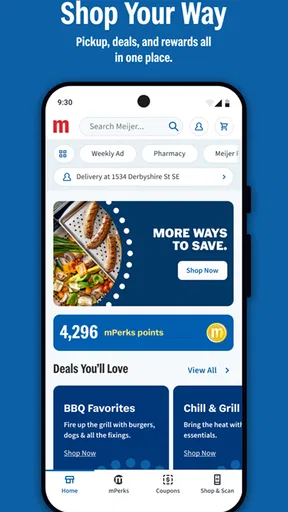
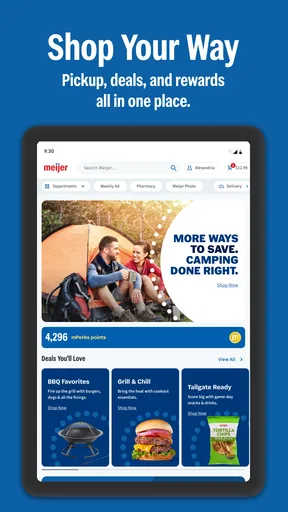
As soon as you're in, you’re greeted with a clean and inviting interface. The home screen is straightforward and user-friendly, offering clear options to start your shopping journey. Whether you're planning to stock up your fridge or just need a few essentials, the app caters to all your needs.
Shopping Made Simple
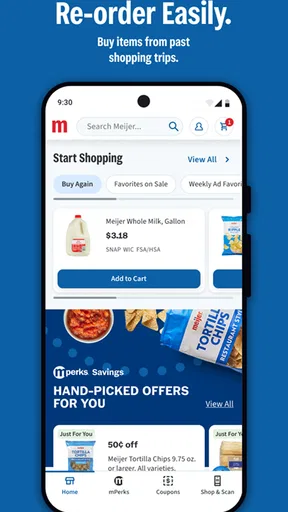
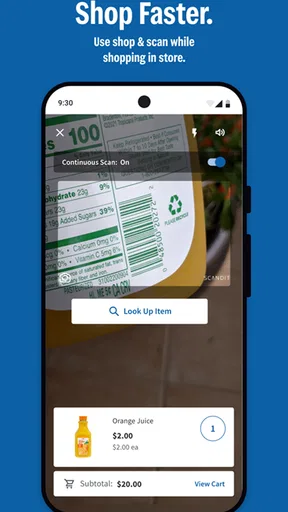
One of the standout features of this app is the seamless browsing experience. You can easily navigate through various categories, from fresh produce to household items. The search function is particularly handy, allowing you to quickly find specific products. And guess what? It even remembers your past purchases, making repeat orders a total snap.
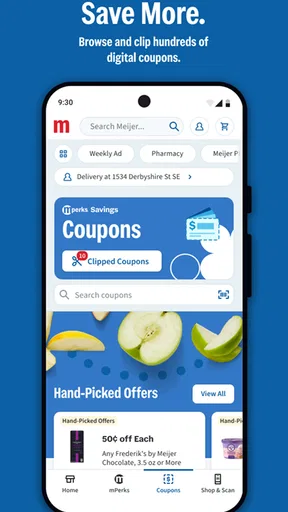
For those of us who appreciate a good deal, the app doesn't disappoint. It highlights special offers and discounts, helping you save a few bucks while stocking up. And let's not forget the "mPerks" rewards program—because who doesn't love earning rewards while shopping?
Delivery & Pickup: Your Choice
Now, onto the core feature: delivery and pickup options. The app gives you the freedom to choose how you want your groceries. Feeling like staying in? Opt for delivery. Prefer a quick trip out? Choose pickup. Both options are incredibly convenient, and you can schedule them at your convenience.
Setting up a delivery is straightforward. You simply add items to your cart, select a delivery window, and you’re good to go. The app keeps you updated on your order status, and you can even track your delivery in real-time. It’s like magic watching your groceries make their way to you!
If you prefer the pickup option, it’s just as easy. You select your items, choose a pickup time, and then head over to the store at your scheduled time. The dedicated pickup lanes make the process quick and hassle-free. You won't even need to step out of your car!
Choosing it over other ways to shop
Compared with walking the aisles, ordering in the app trades browsing in person for planning from a screen. That can be a real advantage when I know what I need, want to repeat a familiar basket, or would rather spend store time collecting an order than locating every item. In-person shopping is still the better fit when I want to inspect produce myself, make spontaneous substitutions, or enjoy browsing without committing to a prepared list.
Compared with a general shopping or delivery service, Meijer’s app is the more natural place to start if Meijer is already where I shop. The retailer-specific focus keeps the experience centered on its departments, offers, and mPerks rather than asking me to compare several stores in one place. The trade-off is that it is not a universal grocery planner: if I routinely shop across different retailers, a multi-store option may be more useful for comparing baskets in one workflow.
A practical way to test whether it fits is to begin with a small, ordinary order instead of moving an entire weekly shop into the app immediately. I would use a short list of known items, compare the cart with what I intended to buy, and see whether the selected fulfillment option works for my routine. That trial gives a better sense of the actual convenience than judging by the home screen alone.
A realistic weeknight workflow
Imagine I realize after work that I am missing ingredients for dinner and a few household basics. I can search for the specific items, use categories if I need to broaden the list, and look over the cart before selecting delivery or pickup. If I am already near the store, pickup may save me from a full shop; if leaving home is the main problem, delivery is the more fitting choice. Either way, I would settle the list and timing before relying on the order, rather than leave the decision until the last minute.
For a recurring shop, the purchase history is most useful as a checklist. I can start from familiar items, remove anything I no longer need, and add the week’s exceptions. This avoids rebuilding a routine basket from scratch while still making room for changes. It is a small workflow improvement, but it also helps prevent the common mistake of repeating an old order without checking whether the household’s needs have changed.
When I am shopping for a particular recipe, I would search for the ingredients individually and review the full cart before checking out. That makes it easier to spot a forgotten item or an unnecessary extra. Promotions are worth checking at this point too, but only after the planned list is in place; otherwise, browsing deals can quietly turn a focused errand into a larger purchase.
Where convenience has limits
The app cannot make every part of grocery shopping effortless. Searching is quick when I know a product name, but broad browsing can still take attention, and familiar past purchases can become clutter if I treat them as an automatic list. I also would not choose delivery or pickup solely because it sounds easier: the right option depends on the schedule and whether I want to be at home or make a stop at the store.
Ordering online also asks me to be comfortable choosing groceries without handling them first. If I have strong preferences about selecting fresh items myself, visiting the store remains the more reassuring option. Likewise, anyone who wants one app to compare several chains may find a retailer-specific tool limiting. The main strength here is not universal coverage; it is a direct route for people whose shopping already centers on Meijer.
Another useful trade-off is the value of planning against flexibility. A prepared cart can make a busy day easier, but it requires me to think ahead enough to select items and a fulfillment time. For a spontaneous run where I want to change my mind aisle by aisle, a regular store visit may feel simpler. I would use the app for repeatable needs and planned errands, not expect it to replace every kind of grocery trip.
Details worth checking before checkout
Before placing an order, I would pause on the final review rather than tap through on autopilot. Confirm that the store and fulfillment choice match the plan, that quantities are sensible, and that the time selected works with the rest of the day. This is also the moment to check how offers and mPerks fit the basket. A quick review is more useful than assuming that an earlier search or saved purchase has carried forward exactly as intended.
For a first-time user, the obvious question is whether an account is needed to get started. The setup flow guides shoppers to create an account or sign in with existing Meijer credentials, so I would have the account I intend to use ready before building a detailed cart. Another practical question is whether the app is a fit for a particular errand: if the goal is a Meijer order and delivery or pickup suits the day, it is relevant; if the goal is comparing multiple retailers or selecting each fresh item personally, another approach may be better.
On Android, compatibility begins with version 7.0, while the app is also available on iOS. It is free to download, and its Everyone age rating makes it suitable for a broad audience. Those basics make it easy to try, but they do not decide whether the shopping flow will suit you; the useful test is whether the store, schedule, and ordering habits line up with your needs.
Final Thoughts
Using the Meijer - Delivery & Pickup app has been a game-changer for me. It’s perfect for the busy bees, the homebodies, and pretty much anyone who values convenience. The app is a testament to how technology can simplify our lives, making grocery shopping more efficient and enjoyable.
In a world where time is precious, this app saves you from those time-consuming trips to the store. Plus, with features like personalized shopping experiences and exclusive deals, it’s hard not to fall in love with it. So, if you haven’t already, give it a try. I promise, once you do, you’ll wonder how you ever lived without it!
My cautious recommendation
I would recommend it most to people who already shop at Meijer and want a straightforward way to arrange a planned delivery or pickup. I would not call it the best choice for every grocery shopper: hands-on produce selection, spontaneous aisle browsing, and comparing several retailers are good reasons to use a different method. For my own routine, the best results come from treating the app as a useful ordering tool, checking the basket and schedule carefully, and choosing the fulfillment option that genuinely saves effort that day.
Pros
- Easy-to-use interface enhances user experience.
- Wide selection of products available.
- Convenient scheduling for delivery or pickup.
- Offers digital coupons and discounts.
- Real-time order tracking is reliable.
Cons
- Limited delivery areas may restrict access.
- App occasionally experiences slow loading times.
- Some items may show inaccurate stock availability.
- Notifications can be overwhelming at times.
- Customer service response can be delayed.
FAQs for Meijer - Delivery & Pickup
What services does the Meijer - Delivery & Pickup app offer?
The Meijer - Delivery & Pickup app provides convenient options for shopping: delivery and curbside pickup. Users can browse through a wide range of products, including groceries, household essentials, and more. The app also offers personalized shopping experiences, digital coupons, and the ability to manage orders seamlessly from your smartphone.
Are there any fees associated with using the Meijer app for delivery?
Yes, the Meijer app may include delivery fees, which can vary based on your location and the size of your order. There might be promotions offering free delivery for first-time users or on orders over a certain amount. Always check the app for the latest details on fees and promotional offers.
Can I use digital coupons within the Meijer app?
Absolutely! The Meijer app allows users to clip digital coupons directly within the app. These coupons can be applied at checkout to help you save on a wide range of products. Be sure to review the terms and expiration dates of each coupon to maximize your savings.
Is it possible to track my orders in real-time through the Meijer app?
Yes, the Meijer app provides real-time tracking for your delivery orders. Once your order is placed, you can monitor its status and estimated arrival time. For pickup orders, the app will notify you when your order is ready, ensuring a smooth and efficient shopping experience.
What should I do if I encounter issues with my order on the Meijer app?
If you experience any issues with your order, such as incorrect items or delivery delays, the Meijer app offers customer support options. You can contact support directly through the app for assistance. Additionally, the app may provide options for refunds or replacements as per their policy.


